
Will your part fit? CNC travel, fixtures and quote scope
Compare usable CNC travel with stock, fixtures, holders and every required setup. Keep extra workholding and verification costs in the machine quote.
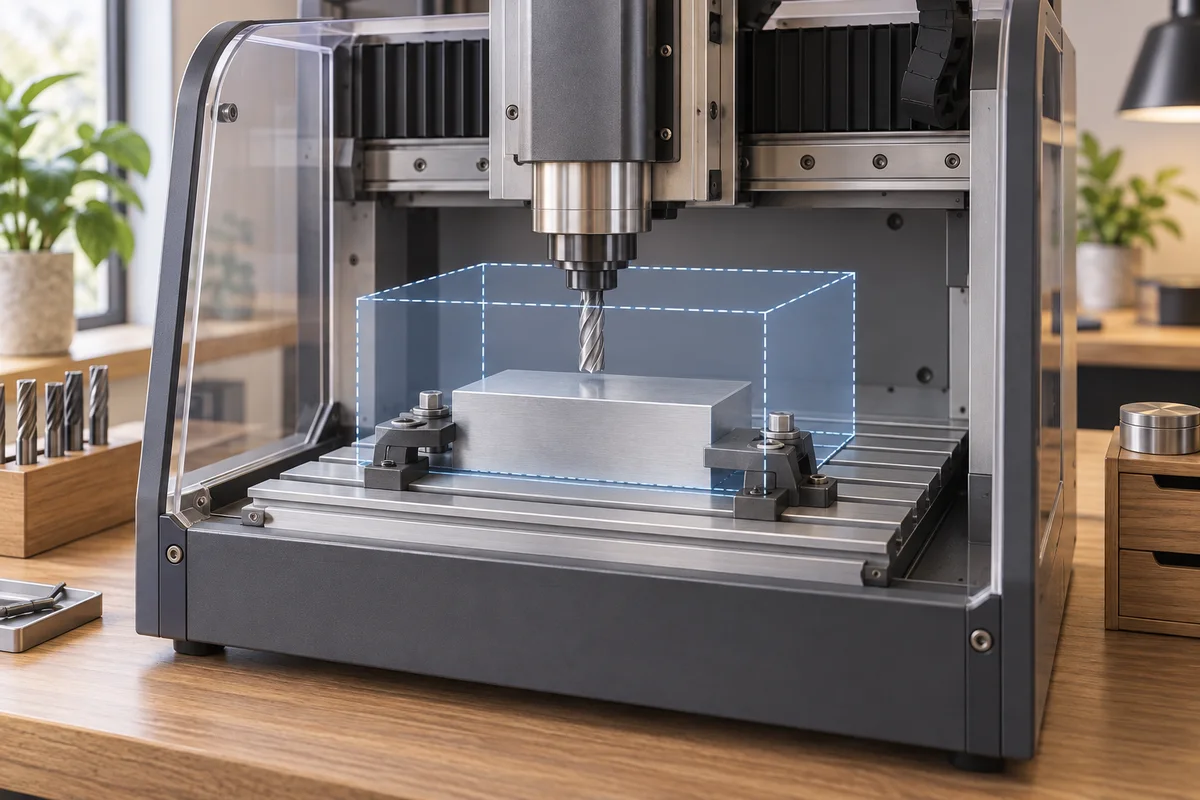
A part fits a CNC only when the full proposed setup and required moves fit the exact configuration. Table dimensions, axis spans and useful setup height answer different questions; none alone settles the purchase.
Compare a complete job pack, not a larger table
For a small workshop buying its first production machine, use the same representative job in every supplier inquiry. Attach one controlled pack containing stock, the fixture proposal, tool assemblies, operations and required results. Add a second part only when it tests a genuinely different purchasing constraint; do not send a collection of unrelated models and expect one blanket confirmation.
| Offer condition | Commercial consequence to keep visible | Evidence owner |
|---|---|---|
| One setup with the quoted fixture | Fixture and mounting items must be included or explicitly excluded | Machine/workholding provider |
| Another setup is required | Additional fixture, programming and operator work are separate scope | Technical planning owner |
| Geometry or holder model is missing | A fit statement remains conditional on that missing input | Provider performing the check |
| Simulated arrangement differs from supply | The accepted model must be reconciled to delivered hardware | Supplier and buyer’s reviewer |
Do not count eliminating a setup as an established saving until the proposed method and acceptance evidence support it. Likewise, a machine with a smaller table may still be a valid candidate if the documented arrangement answers the actual job. The outcome should identify what the buyer is purchasing, not merely select the highest axis number.
Keep the test piece’s drawing revision with the layout. A later fixture substitution can alter the geometry even when the machine model stays the same. Ask for an updated applicability response and record whether the quotation changes. This comparison extends the existing coordinate worksheet; it does not replace the provider’s technical assessment.
The question that matters is whether this machine can finish this part with the proposed workholding and operations. Nominal X, Y and Z travel is only an input; its adequacy depends on the part’s position, tool access, retract moves and surrounding hardware.
Freeze one representative setup
Choose a demanding part you expect to make often. Submit the released drawing and model, the material and the starting stock dimensions. Include the fixture or vice model, its location, jaw configuration, parallels or risers, planned tools and holders, and the work-coordinate origin.
If you do not own the fixture yet, ask the seller to propose one and return its dimensions. “A standard vice is included” leaves the setup unresolved. Record whether the quote includes the fixture, mounting hardware and any additional setup needed to finish the part.
A CAM setup has separate definitions for its coordinate system, model and fixtures. Autodesk’s documentation makes those separate choices explicit; they should also be explicit in the purchase brief. Fusion milling setup reference.
Separate four dimensions that listings can blur
Ask for a dimensioned machine drawing showing the table, axis travel and physical clearance references. Keep the following fields separate:
- Table footprint: where stock or a fixture can be supported and attached.
- Axis travel: the reachable machine-axis range for the exact configuration.
- Setup height: the stock and workholding stack relative to the identified table reference.
- Tool access: the holder, tool and spindle positions required to reach the feature and retract safely.
Do not find the maximum work height by subtracting the vice height from Z travel. Z travel describes a range of movement; available height depends on the geometry, tool assembly and starting position. Ask the supplier for a dimensioned layout of your setup.
Build an extents worksheet in one coordinate system
Have the supplier explain how the planned work origin maps to machine coordinates. For each operation, request the minimum and maximum tool positions, approach and departure positions, and relevant fixture clearances. Show the units and keep the coordinate convention consistent throughout.
Use worksheet columns for the axis, required minimum and maximum, required span, quoted reachable range, clearance reference and evidence. A matching span is not enough if the required interval extends beyond either end of the reachable range. A cutter path that fits may still bring the holder into contact with a clamp.
Include moves between operations and the documented tool-change position. A demonstration of a pocket in the table’s centre does not establish that the seller has checked your edge features or tall clamping arrangement.
An illustrative X-axis check
Suppose a hypothetical top-face operation needs the tool centre to sweep a 260 mm span, plus 10 mm of approach and 10 mm of departure along X. The required span is 260 + 10 + 10 = 280 mm. Those invented allowances are for arithmetic only; they are not recommended safety distances or a cutting strategy.
A quoted 300 mm X travel exceeds that span by 20 mm. It does not automatically pass the setup: the supplier must place the whole 280 mm interval within the reachable range, account for the fixture and check every relevant move. The 20 mm is a span difference, not proof of 10 mm safe clearance at each end.
Use the actual programmed extents and the manufacturer’s required allowances. Check Y and Z separately. This simplified X example establishes neither their adequacy nor the holding force.
Request verification evidence, then a representative test
Ask for the model used for the check, machine limits, fixture and holder geometry, toolpath version and the resulting issue report. If machine simulation is offered, confirm what it actually includes. Autodesk distinguishes machine simulation, which uses machine/post kinematics, from a basic simulation without that information; it can report collisions and axis overtravel. Fusion manufacturing simulation.
An animation is not a complete verification report, and a simulation relies on correct input geometry and configuration. Have competent personnel review the proposed setup and carry out physical checks according to the manufacturer’s instructions. Then perform the agreed representative cut and measurements. Fitting the geometry or passing a simulation does not prove stiffness, retention or part accuracy under load.
Make a second setup visible in the quote
If the part needs repositioning, ask how it will be located again, which features serve as references and which acceptance measurements check the relationship between setups. Include the extra fixture, programming, operator work and test scope. A larger machine may eliminate the second setup, but its suitability still requires the same evidence.
Copy this fit-check RFQ
“Please confirm whether the attached part, starting stock, fixture and tool assemblies can complete all listed operations on the quoted machine revision. Return a dimensioned arrangement, work-origin mapping, required and reachable axis ranges, and approach/retract/tool-change checks. State any omitted geometry, unresolved collision or second setup. Include the exact workholding and mounting hardware in the quote, and propose a representative cut with agreed measurement criteria.”
Use the CNC quote form with this pack. If the machine type is still undecided, review the router versus mill guide first.
AI-assisted editorial update, 26 October 2026. Sources and bilingual wording were checked with AI assistance; technical acceptance remains with the responsible provider.
Related purchasing decisions: Workholding purchasing scope.
Put this guide to work
Working notes to adapt to your order. Keep the approved specification and the cited guidance alongside this sheet.
A part fits a CNC only when the full proposed setup and required moves fit the exact configuration. Table dimensions, axis spans and useful setup height answer different questions; none alone settles the purchase.
Check the scope behind a supplier's fit answer
| Check | Record to keep | If unresolved |
|---|---|---|
| Confirm that the reply uses the submitted setup and machine revision. | Identified part and stock, fixture position, tool and holder geometry, machine drawing and the matching setup reference. | Ask which geometry was checked and record every substitution or omission before comparing the reply with another supplier's answer. |
| Match required and reachable positions in the same coordinate convention. | Operation ranges with units, work-origin mapping and clearance references for the quoted configuration. | Request the interval and origin mapping; keep a table-size or travel-span comparison separate from a completed setup check. |
| Include movement outside the cutting path in the review. | An issue record covering approach, retract, movement between operations and the documented tool-change position, with the relevant fixture and holder geometry included. | Identify the unchecked move or missing geometry and request its review rather than relying on a cutting-path animation alone. |
| Separate geometric review from representative test and measurement results. | The check's input and scope, unresolved issues, and the agreed physical test and measurement record where completed. | Keep the missing result open and refer the physical checks to competent personnel following the manufacturer's instructions. A geometric result alone does not establish retention or accuracy under load. |
| Show any repositioning requirement in the quotation. | The locating references, relationship measurements and quoted fixture, programming, operator work and test scope for the additional setup, if needed. | Ask whether repositioning is needed and obtain its scope; do not treat an unmentioned additional setup as included. |
Setup fit and unresolved-issue worksheet
Use the same setup reference for each supplier response. Enter actual agreed inputs and supplier evidence; the worksheet supplies no clearance allowance or operating instruction.
| Field | What to enter | Decision or handover |
|---|---|---|
| Configuration used for the reply | [Part/model revision], [Stock], [Fixture/position], [Tools/holders], [Machine/revision] and [Coordinate convention]. | Compare replies only after their configuration differences are identified. Request a check of the agreed setup when the evidence describes another arrangement. |
| Operation or movement with an unresolved fit question | [Operation/move], [Required interval], [Reachable interval], [Units/origin mapping], [Interference or omission] and [Evidence reference]. | Refer the specific interval, move or interference for resolution. A matching span does not establish that the interval fits in the reachable range. |
| Evidence coverage and status | [Input geometry], [Checked scope], [Omitted geometry], [Open issues] and [Physical test/measurement status]. | Record what each result demonstrates. Keep geometry, simulation and physical acceptance evidence distinct rather than turning an animation into a complete acceptance result. |
| Repositioning and quotation scope | [Locating method], [Reference features], [Relationship measurement], [Additional fixture/program/operator work] and [Quote reference], if applicable. | Resolve the proposed setup relationship and its included work before comparing quotation totals. Record an agreed absence of repositioning explicitly. |
Send a supplier the remaining fit questions
Please review setup [SETUP] on quoted machine revision [MACHINE]. The open items are [ISSUES], and the evidence currently covers [SCOPE]. Please return the corresponding dimensioned arrangement, origin mapping and movement checks at [EVIDENCE], identifying omitted geometry or a changed setup. If repositioning is needed, link its locating method, relationship measurements and included work to [QUOTE]. Our reviewer [OWNER] will record the remaining decisions in [LOG]; physical checks and the representative test remain subject to the manufacturer's instructions and the agreed acceptance scope.
Frequently asked questions
Is table size the machining area?
No. Supporting area, axis reach and tool/fixture clearances are different parts of the setup definition.
Does a successful simulation prove the part will meet tolerance?
No. Simulation depends on its models and configuration, and does not by itself prove loaded stiffness, holding performance or measured part quality.
How should a second setup affect the quote?
List its fixture, programming, handling and agreed verification scope separately, then compare complete accepted-job proposals.
Sources
Discuss a sourcing request related to this article.Will your part fit? CNC travel, fixtures and quote scope
Prepare a clearer buying request
Keep this page as context. Add what you know; review everything before sending. No purchase is made at this step.
Edit the checklist below before continuing. It stays a planning note; it does not approve a product or order.
- Offer condition
- Commercial consequence to keep visible
- Evidence owner